TigerConnect
- 3.2
- Rating
- 1.00M
- Installs
- Free
- Price

 Analysis by App-foxy
When I first opened TigerConnect, I had to adjust my expectations. This is not a household chat app, a family calendar, or a general-purpose messenger. It is a medical communication app from TigerConnect Inc, designed around clinical communication rather than casual conversation. That distinction matters immediately: its value depends heavily on whether your workplace or care organization already uses it.
In my experience, the most useful way to judge it is as a focused work tool that may happen to sit on a shared or personal phone. If you are a healthcare professional who needs to stay connected with the right clinical team, it can make communication more organized than scattered calls and ordinary messaging. If you are simply looking for a way for relatives to coordinate appointments, prescriptions, or daily care at home, it is probably the wrong choice.
The app is free to download and has an Everyone content rating, but those labels should not be confused with universal suitability. “Everyone” describes the age context of the app, not the type of person who will benefit from it. The real question is whether you have legitimate access to a participating healthcare environment and a clear reason to use a clinical communications system.
You May Also Like

 Pandora - Music & Podcasts
Pandora’s Music Is Easy to Start, but Harder to Recover
Pandora’s strength is its low-effort path from a seed to a station. Its weak spot is how much confidence it asks you to place in connection, setup, and quiet recovery.

 8 Ball Pool
 Is Built on Rivalries, Rematches, and Routine
A close look at the rivalries, rematches, shared routines, and unanswered safety questions that turn a quick pool match into a persistent mobile community.

 Samsung Music
’s Quiet Strength Is Playing What You Already Own
Its reach comes less from spectacle than from dependable access to a personal library. That simplicity is both the app’s strongest retention engine and its ceiling.

 AccuWeather: Weather Radar
AccuWeather Review: A Quick, Clear Forecast for Everyday Decisions
For everyday plans, the best forecast is the one you can understand quickly. AccuWeather makes rain timing, radar, and local conditions easy to act on, with a few trade-offs.

 Hill Climb Racing
Why Hill Climb Racing Still Turns Crashes Into One More Run
A tiny car, a bumpy hill and one more upgrade: Hill Climb Racing keeps resurfacing because its simple chaos makes every near-miss feel personal.

 AliExpress - Shopping App
AliExpress Makes Global Shopping Feel Personal, but Shoppers Bear the Risk
AliExpress turns a global marketplace into a pocket-sized discovery engine. Its reach is useful, its shopping loop compelling, and its trade-offs easy to miss.
More From Our News Desk
View All News


How TigerConnect fits into a shared-device routine
A realistic shared-device scenario might involve a family tablet or phone kept in a home office, where several people use the device for different tasks. One person may need to check a work message during a shift, while another uses the same device for ordinary household communication. TigerConnect can belong in that environment, but it should not be treated like a shared family inbox.
The important boundary is the account. Clinical messages are tied to professional communication, so letting several household members casually browse or answer them would create confusion and could create serious privacy problems. I would only use it on a shared device if each person understands whose account is active, the device can be kept private when necessary, and the household has a clear habit of signing out or handing over the device responsibly.
This is one of the less obvious practical issues with a medical communication app: the physical phone may be shared, but the communication context should not be. A family member who sees a notification might assume it is an ordinary message and open it out of curiosity. That is exactly the kind of casual behavior I would avoid here. The app should be treated more like a work system than a family messaging thread.
For a clinician working from home, the shared-device question is also about interruptions. If your phone is used by children or other relatives, important work alerts can be buried among personal notifications. I would keep the app on a device that remains under the professional user’s control whenever possible. If that is not possible, a separate user profile or a dedicated work phone may be more sensible than trying to turn a family device into a clinical workstation.
That does not make the app unsuitable for home use. It simply means the home is only the location, not the audience. A nurse checking a care-team conversation from home is using it for professional coordination. A relative trying to use it as a private family group chat is asking it to do something outside its natural purpose.
What setup feels like in practice
The first setup boundary is organizational access. TigerConnect is not the kind of app I would install and expect to create a useful network by itself. Its benefit comes from being connected to the clinical communication structure your employer, facility, or care organization has established. Without that context, the app may have little practical value even if installation is simple.
I would therefore confirm the intended workflow before downloading it for a team. Find out who is expected to use it, which conversations belong there, and what should still be handled through established channels. This avoids a common mistake: installing a communication tool first and deciding later what it is supposed to replace.
The Android release supports devices running Android 8.0 or later, and the current version is 9.12.76. Those details make compatibility reasonably approachable for many users, but compatibility alone does not guarantee a smooth rollout. Older phones may be less comfortable for long work sessions, and a busy clinical environment can expose small points of friction that are invisible during a quick installation.
I would also set up the app with the same care I would give any professional account. Use the correct work identity, check which device is signed in, and make sure notifications do not reveal more than they should on a lock screen. I am not treating those steps as optional polish. On a shared phone, they are part of using the app responsibly.
Another useful habit is to decide what happens when a phone is replaced, lost, or temporarily borrowed. The answer may depend on the organization’s own procedures, so I would not improvise. A communication app used in healthcare needs a clear handoff process, especially when the device changes hands or a staff member moves between shifts.
Coordination is where the app earns its place
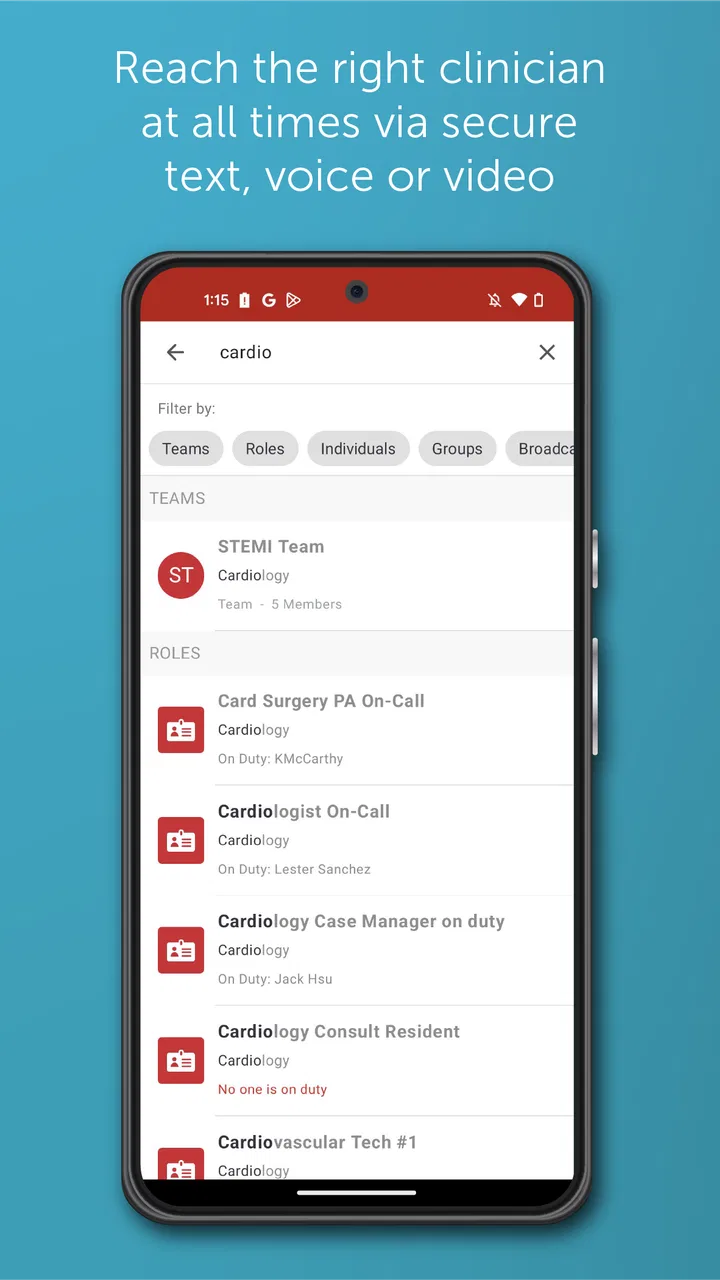
The strongest case for TigerConnect is coordination. Healthcare work often involves several people who need the same information at the right moment, but who are not standing in the same room. A focused clinical communication tool can be more practical than relying on personal text messages, repeated phone calls, or a chain of forwarded updates.
In a typical shift, I can imagine a clinician needing to reach the appropriate colleague, clarify a task, and keep the conversation connected to the working team rather than scattering it across individual phones. The benefit is not simply speed. It is reducing the chance that a message goes to the wrong person, becomes buried in a personal inbox, or is remembered differently by each participant.
That said, I would not assume every message belongs in the app. Urgent situations still require the escalation method defined by the organization. A message-based workflow can support coordination, but it should not encourage staff to wait for a response when immediate action is required. The app is most useful when it fits into a larger communication procedure rather than pretending to be the entire procedure.
One practical insight is to use it for clear handoffs rather than vague updates. A short message that identifies the patient context according to workplace rules, the task, and the expected next step is easier for a team to act on than a stream of incomplete comments. The app cannot repair an unclear workflow, but it can give a disciplined team a cleaner place to carry one out.
Another trade-off is concentration. Centralizing work communication can reduce fragmentation, but it can also create a steady flow of alerts. I would be deliberate about when I check messages and how I distinguish routine coordination from something that needs immediate attention. If every notification is treated as equally urgent, the app may add stress instead of reducing it.
This is also where TigerConnect differs from ordinary messaging apps. A consumer messenger is usually built around personal contacts and informal conversation. Its strength is convenience for people who already know one another. A clinical communications app is judged more by whether it supports professional boundaries and team-based work. That makes it less flexible for family life, but potentially more appropriate for healthcare operations.
Age, trust, and the limits of household access
The Everyone rating may reassure families that the app is not presenting mature entertainment content, but it does not mean a child should use a professional healthcare account. The account boundary matters more than the age label. I would not hand the phone to a child and leave the app open, even if the child is only using another part of the device.
Trust works differently here than it does in a family calendar. In a household app, sharing access can be convenient. In a clinical communication environment, access should follow role and responsibility. A spouse, parent, or older child may be trusted personally, yet still should not read or send professional messages simply because the device is available.
This makes TigerConnect a poor choice for family coordination around an older relative unless the family is using a separate, appropriate communication channel for that purpose. If the goal is to remind someone about a doctor’s visit, tell a sibling that medication was collected, or organize transport, a normal family messenger or shared planner will usually be easier and less restrictive.
For professional users who live with children, I would keep the app protected by the device’s normal security measures and avoid displaying message content in casual settings. I would also explain to other household members that the app is work-related and not a place to explore. That simple conversation can prevent awkward misunderstandings when a notification appears during dinner or while someone is borrowing the phone.
There is a broader trust issue as well. A healthcare communication tool should not be used as a substitute for personal judgment about what may be shared. Before sending anything, I would check the recipient, the purpose of the message, and whether the information belongs in that channel. The convenience of a quick message can make people less careful, so the user has to supply the discipline.
Where it compares well, and where another option wins
Compared with phone calls, TigerConnect can be more convenient for non-urgent coordination because the recipient can review a written message when available. Compared with ordinary texting, it is better aligned with a professional setting where communication should remain separate from personal conversations. Those are meaningful advantages for a healthcare team already organized around the platform.
Compared with email, a focused communication app may feel more immediate for active teamwork. Email remains useful for formal, detailed, or less time-sensitive communication, but it can become crowded when a team needs quick back-and-forth coordination. I would see TigerConnect as a complement to established systems, not automatically a replacement for every message, document, or call.
Compared with family chat apps, the difference is even clearer. Family messengers are easier for mixed-age households, informal planning, and personal updates. They are the better option when the participants are relatives rather than clinical colleagues. Choosing TigerConnect for that job would add professional complexity without solving the family’s actual need.
The app also may not suit a healthcare worker who only needs occasional contact with one colleague and already has a reliable approved method. A new platform introduces another place to check, another account boundary to remember, and another workflow to learn. Its value increases when communication is frequent, team-based, and connected to an organization that expects people to use it consistently.
Its average rating is 3.2 from around 5,400 ratings, which suggests a mixed experience among users. I would read that as a reason to judge the app in context rather than as a simple pass-or-fail signal. A communication tool can be valuable in one organization and frustrating in another, depending on adoption, notification habits, training, and how clearly responsibilities are defined.
Small habits that make the experience better
My first recommendation is to separate “available” from “immediately responsive.” If a team treats every message as urgent, the app becomes noisy. Agreeing on response expectations outside the app can make the communication itself more useful. That is an organizational habit, but it directly affects how much value the software provides.
Second, keep messages purposeful. A concise request with the necessary context is easier to act on than multiple fragments sent moments apart. This is especially important on a shared device, where another household member might see a notification without understanding the professional context. Clear messages reduce both work confusion and accidental exposure.
Third, review the device boundary whenever the phone changes owner. If a colleague borrows a device, if a family member needs it for a trip, or if a work phone is being retired, do not rely on memory. Make the account handoff part of the routine. The app is only as private as the habits around the device.
Fourth, use the app where it is strongest and keep other channels for tasks they handle better. I would not force long-form documentation, personal family planning, or emergency escalation into a single messaging tool. The best workflow is usually a combination: TigerConnect for the approved clinical coordination it is intended to support, and other channels for their proper roles.
Finally, give new users a short period to learn the local conventions. The buttons and screens are only one part of the experience. Knowing which team to contact, what information belongs in a message, and when to call instead is more important than learning the interface quickly. That is why organizations should introduce the app with practical examples rather than simply telling staff to install it.
My household verdict
TigerConnect is a specialized medical app, not a general communication solution for the home. Developed by TigerConnect Inc, it has passed the point of being a niche experiment, with over one million installs, but its usefulness still depends on professional context. I would recommend it to healthcare workers whose organization has adopted it and who need a focused way to coordinate with clinical colleagues.
I would not recommend it to a family looking for a shared space to manage care at home. The free price and Everyone rating may make it look approachable, but neither changes the central issue: this is built around clinical communication and account responsibility. A family messenger, shared calendar, or ordinary calling arrangement will usually be simpler for relatives.
For a shared household device, my verdict is cautious but practical. It can work when the professional account remains under the correct user’s control and everyone understands that the app is not for casual browsing. It is a poor fit when several people need equal access, when children regularly use the device, or when the household wants informal coordination rather than workplace communication.
After using it with those boundaries in mind, I see TigerConnect as a tool that rewards a disciplined environment. It can make team communication feel more focused than personal messaging, but it cannot replace clear procedures, careful judgment, or appropriate escalation. If you need that kind of clinical coordination, it is worth considering. If you simply need to keep a family organized, I would choose something designed for family life instead.
FAQs for TigerConnect
01What is TigerConnect and what does it do?
TigerConnect is a secure messaging platform designed for healthcare professionals to streamline communication and improve workflow efficiency. It enables users to send messages, share files, and make voice or video calls in compliance with HIPAA regulations. The app is particularly beneficial for hospitals and medical practices looking to enhance team collaboration and patient care.
02Is TigerConnect secure for sharing patient information?
Yes, TigerConnect is designed with security as a top priority. It complies with HIPAA regulations, ensuring that all communications are encrypted and secure. This makes it a reliable choice for healthcare professionals who need to exchange sensitive patient information without compromising confidentiality and data integrity.
03Can TigerConnect integrate with other healthcare systems?
TigerConnect offers integration capabilities with various electronic health record (EHR) systems and other healthcare applications. This allows for seamless data sharing and enhances the functionality of the app by providing real-time access to patient records and other critical information, thus improving clinical workflows and decision-making.
04Is there a cost associated with using TigerConnect?
TigerConnect generally offers a tiered pricing model that varies based on the features and number of users. While the app may provide a free version with limited features, healthcare organizations typically opt for a paid plan to access advanced functionalities and support. It's advisable to contact TigerConnect directly for a detailed pricing structure tailored to your organization's needs.
05How user-friendly is TigerConnect for healthcare professionals?
TigerConnect is designed with user-friendliness in mind, offering an intuitive interface that is easy to navigate. It provides streamlined features for quick messaging, file sharing, and calling, which can be particularly beneficial in a fast-paced healthcare environment. The app also offers support and training resources to help users get the most out of the platform.
Pros
- Intuitive user interface enhances usability.
- Secure messaging with end-to-end encryption.
- Real-time notifications keep you updated.
- Cross-platform compatibility boosts accessibility.
- Efficient team collaboration features.
Cons
- Limited offline functionality impacts usability.
- Some features require premium subscription.
- Occasional sync issues across devices.
- User interface could be more customizable.
- Learning curve for new users.

TigerConnect
Gallery